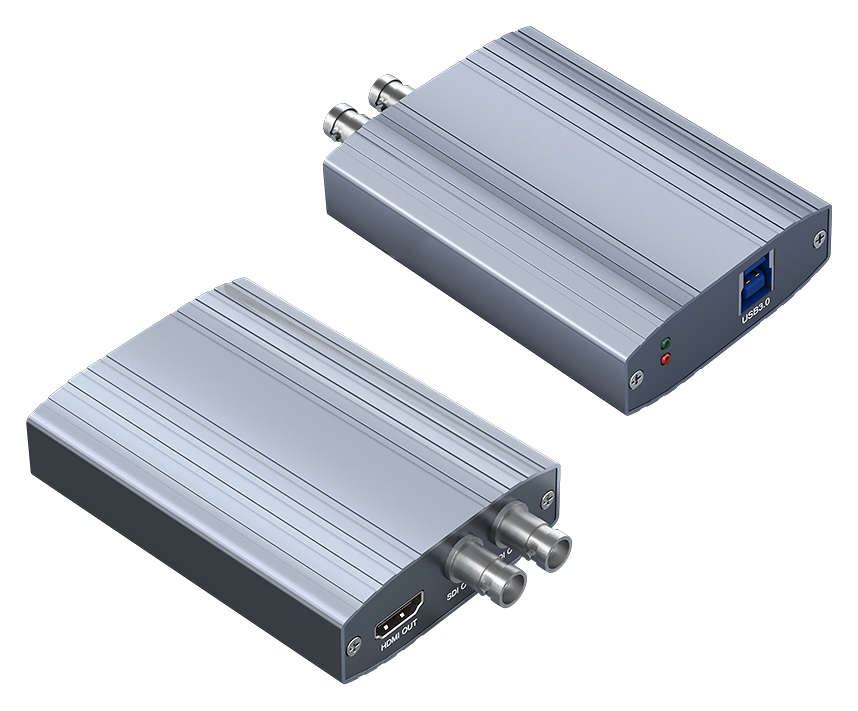
USB 3.0 PROFESSIONAL EXTERNAL VIDEO OUTPUT
HDMI and Dual 3G-SDI External Video Output Box
Connects to a computer through USB 3.0 and outputs the desktop, production canvas or application program feed to one HDMI and two 3G-SDI destinations. All three video outputs can operate simultaneously at up to 1920×1080@60Hz. The device supports extended and mirrored display modes as well as vMix external output for live production, studio monitoring, conference display and professional video distribution.
USB 3.0 HostHDMI 1.4 Output2× 3G-SDI OutputsUp to 1080p60Three Simultaneous OutputsAluminum Enclosure
KEY ADVANTAGES
From Computer Desktop to Professional HDMI and SDI Output
Three Simultaneous OutputsOne HDMI and two 3G-SDI interfaces can output together for synchronized display and distribution.
Extended Display ModeAfter driver installation, the device can operate as an independent display for desktop extension.
Mirrored Display ModeThe primary display can be mirrored simultaneously to the HDMI and dual SDI outputs.
vMix External OutputWith the matching driver and plug-in, vMix program video can be routed directly to the output box.
Up to 1080p60Supports video output up to 1920×1080@60Hz with backward-compatible resolutions.
Compact Metal EnclosureThe aluminum external enclosure supports portable or fixed installation with effective heat dissipation.

TRANSPARENT PRODUCT VIEW
USB 3.0 HDMI and Dual 3G-SDI Output Terminal
USB 3.0 · 1× HDMI OUT · 2× 3G-SDI OUT · 1080p60
The host side connects through USB 3.0, while one HDMI 1.4 and two 3G-SDI outputs connect to displays, professional monitors, switchers, converters or other video systems.
Maximum output up to 1920×1080@60Hz
HDMI and dual 3G-SDI can output simultaneously
Extended, mirrored, full-screen and vMix external output modes
Supports Windows, macOS and Android
WORKFLOW
Four Steps to Professional Video Output
Choose a system display mode or application external-output mode, then route computer video to HDMI and SDI destinations.
01 · CONNECTConnect the USB 3.0 hostConnect the external output box to a computer or compatible host through USB 3.0.
02 · INSTALLInstall driver and plug-inInstall the matching driver; vMix external output also requires the supplied plug-in.
03 · MODESelect the output modeChoose extended, mirrored, application full-screen or vMix external output.
04 · OUTPUTConnect display equipmentConnect HDMI or 3G-SDI monitors, switchers or other video equipment.
CORE SPECIFICATIONS
Technical Specifications
| Product Type | USB 3.0 HDMI and dual 3G-SDI external video output box |
| Host Interface | USB 3.0 |
| Video Outputs | 1× HDMI 1.4 and 2× 3G-SDI |
| Simultaneous Output | HDMI and both SDI interfaces can output simultaneously |
| Maximum Resolution | 1920×1080@60Hz with backward compatibility |
| Operating Modes | Extended display, mirrored display, application full-screen and vMix external output |
| Operating Systems | Windows, macOS and Android |
| Enclosure | Aluminum alloy |
| Software Note | vMix external output requires the matching driver and plug-in; 100% system display scaling is recommended |
APPLICATIONS
Production, Monitoring and Professional Display Systems
Live ProductionStudio MonitoringConference DisplayProgram OutputVideo DistributionLecture CaptureMedical DisplayOEM / ODM Integration
Usage note: This is a video output device, not a video capture card. Available functions and operating modes may vary with the operating system, driver and application version. For vMix external output, 100% system display scaling is recommended.