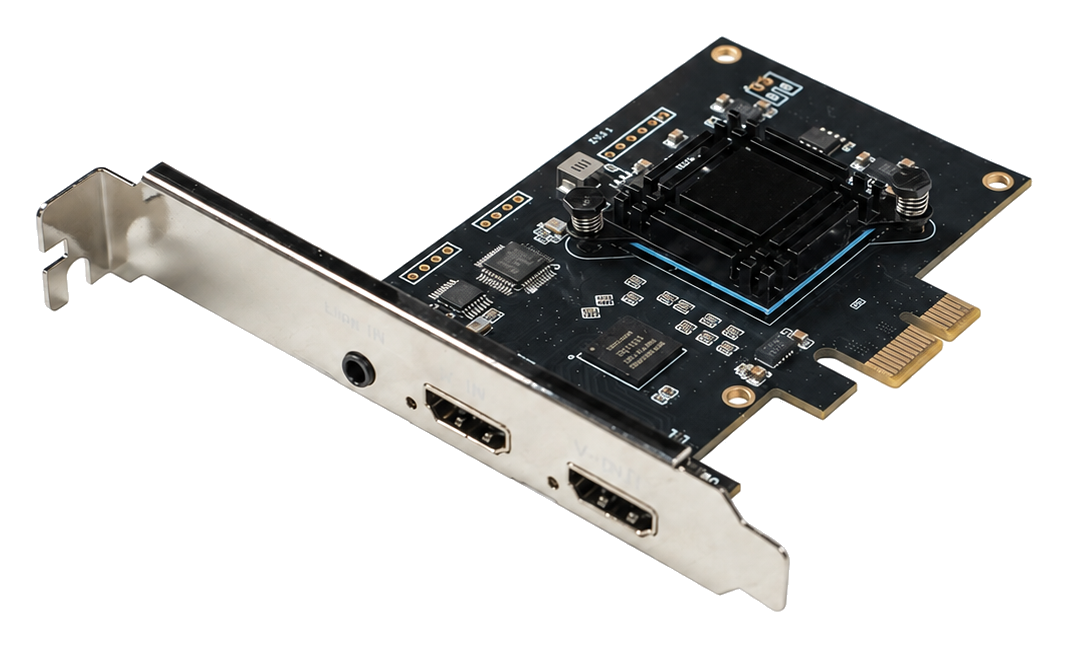
VIDEO INPUT
HDMI 2.0 Input / Loop-OutOne HDMI 2.0 input and one HDMI loop-through output support capture with local monitoring.CAPTURE
Up to 1080p60Captures video at up to 1920×1080 at 60 fps for smooth preview, recording, and streaming.HOST INTERFACE
PCIe 2.0 x1A 5 Gbps host link provides a compact internal solution for standard PCI Express systems.
CORE CAPABILITIES
Core Capabilities for Professional Workflows
4K60 Input CompatibilityAccepts HDMI input signals up to 4K60 and delivers capture output at up to 1080p60.
On-Board Video ProcessingVideo processing is handled on the card to reduce the processing load on the host CPU.
Hardware DeinterlacingHardware deinterlacing improves the presentation and processing of interlaced video sources.
Flexible Audio CaptureCaptures HDMI embedded audio or analog Line-in audio with PCM 48 kHz stereo support.
CAPTURE WORKFLOW
Video Capture Workflow
01 · VIDEO SOURCEConnect the SourceConnect an HDMI 2.0 source and, when needed, an HDMI loop-through display.
02 · ON-BOARD PROCESSINGProcess on the CardAutomatically detect the input format and perform hardware deinterlacing as required.
03 · PCIe TRANSFERTransfer to the HostSend audio and video data over PCIe 2.0 x1.
04 · APPLICATIONUse in SoftwarePreview, record, stream, analyze, or integrate through an SDK.
KEY SPECIFICATIONS
Key Specifications
| Product Type | Single-channel HDMI internal PCIe capture card |
|---|---|
| Video Interfaces | 1 × HDMI input and 1 × HDMI loop-through output |
| Input Standard | HDMI 2.0 |
| Maximum Input | Video input signals up to 4K60 |
| Maximum Capture | Up to 1920×1080 at 60 fps |
| Video Output Formats | YUY2 、NV12 and xRGB |
| Audio Capture | HDMI embedded audio or Line-in; PCM 48 kHz stereo |
| Hardware Processing | Hardware deinterlacing, automatic input-format detection, and multi-stream output at different resolutions |
| Host Interface | PCI Express 2.0 x1, 5 Gbps |
| Software Interfaces | DirectShow / DirectSound (Windows), V4L2 (Linux) |
| Operating Systems | Windows / Linux |
| Video Loop-Through | 1 × HDMI loop-through output |
| Dimensions | 98 × 96 mm |
| Power Consumption | ≤ 5 W |
| Operating Temperature | 0 to 85°C |
| Storage Environment | -20 to 70°C; 5% to 90% RH, non-condensing |
APPLICATIONS
Typical Applications
Video Preview and RecordingLive Production and StreamingConference and Lecture CaptureMedical Imaging SystemsMachine Vision and InspectionImage Analysis and ProcessingOEM / ODM System Integration
Specification note: 4K60 refers to the maximum accepted HDMI input signal; maximum video capture is 1080p60. Available resolutions, frame rates, pixel formats, loop-through behavior, and HDCP-content compatibility depend on the source, host platform, driver, and application configuration. Protected or encrypted content may not be capturable. Refer to the applicable driver, SDK, and confirmed product documentation for final compatibility.